Updated:
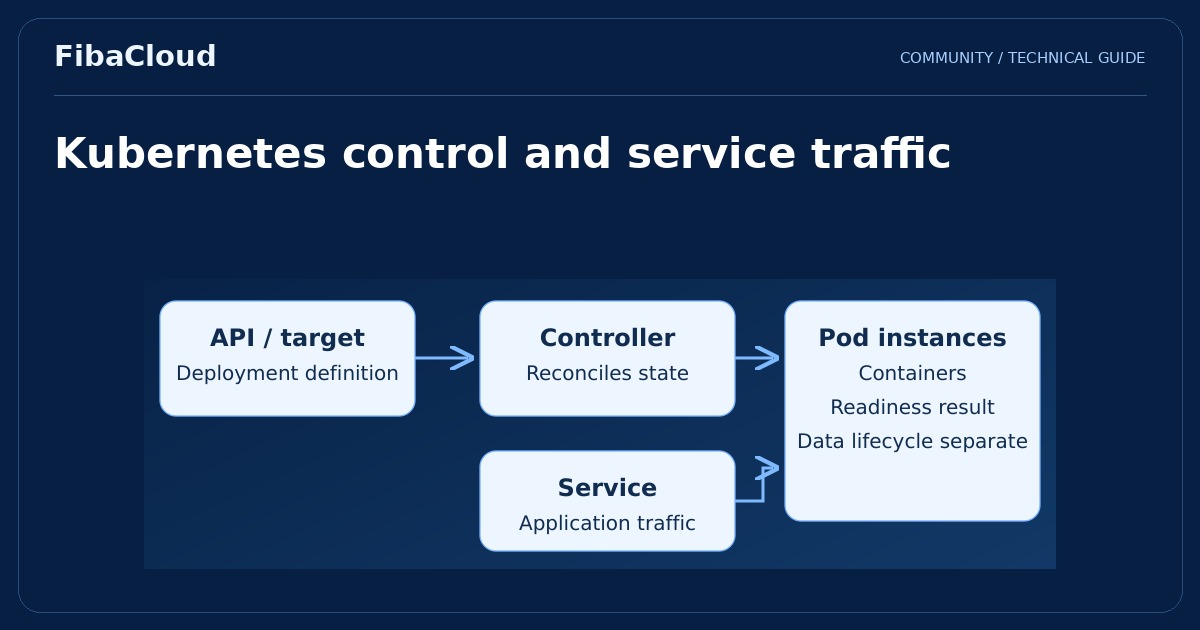
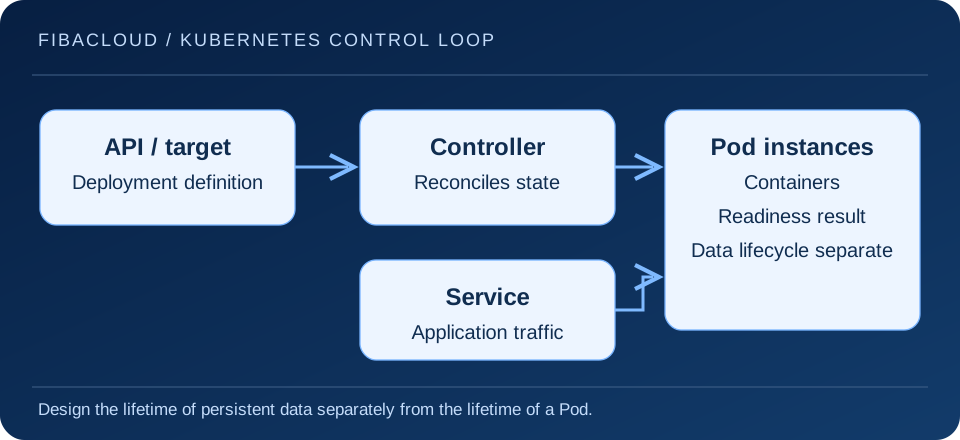
Kubernetes is an open source platform that helps keep containerized workloads aligned with a declared state. A team describes the instances and resources it needs, and controllers work to reconcile the actual state with that goal. This operating model supports application management but does not replace application or data architecture.
Enlarge illustration →
Understand the building blocks
A Pod is Kubernetes’ smallest scheduled execution unit and can contain one or more related containers. A Deployment manages updates and replicas for workloads commonly designed to be stateless. A Service provides a stable access abstraction in front of changing Pod addresses. These objects are complementary building blocks, not interchangeable names for an application.
The control plane provides API and control functions. A kubelet on a worker node manages execution of assigned Pods. The scheduler considers resource requests and placement constraints. Available capacity, node health and networking determine whether the cluster can actually reach the requested state.
Reconciliation has practical limits
Restarting a container does not correct faulty application logic or damaged data. Missing credentials, an unavailable database or invalid configuration can affect the replacement Pod in exactly the same way. Investigate events, application logs and dependencies together. A high restart count is a symptom to understand, not evidence of successful recovery.
A readiness probe reports whether an instance should receive traffic and generally influences its participation in Service endpoints. A liveness probe can cause a container to be restarted. A startup probe gives a slow-starting application a separate startup assessment. Poorly designed liveness checks can repeatedly restart a busy but otherwise healthy application.
Define resources and persistent data
Requests inform scheduling and limits constrain resource use. An undersized memory limit can result in termination, while unrealistic requests can leave capacity poorly allocated. Derive values from startup behavior and representative load. CPU and memory constraints do not have identical enforcement behavior.
A Pod’s writable filesystem is not a persistence strategy. Databases and user files need suitable storage, access modes, backups and a restoration process. A PersistentVolume is not automatically a backup. Driver behavior, location dependencies and reattachment conditions influence what recovery can achieve.
Plan a controlled first deployment
- Confirm the supported cluster release and version compatibility between components.
- Select a small application with understood dependencies and a trusted, fixed image version.
- Define realistic resource requests, appropriate probes and controlled network access.
- Limit service account permissions and keep secrets out of images and public repositories.
- Exercise deployment, rollback, node failure and data restoration as separate scenarios.
This introduction is not a version-specific installation procedure. Confirm that the APIs you use are supported by the target cluster. Do not apply an old manifest merely because its resource names look familiar. For a managed service, read the boundary between provider-operated control plane components and customer-managed workloads.
Decide whether the complexity is justified
A small team operating one straightforward application may be better served by a simpler server deployment. Kubernetes becomes useful when repeatable releases, multiple services and automation justify its operating cost. The team needs capacity to update, observe and recover the cluster as well as create it.
Define a successful pilot in application terms: a release reaches healthy instances, an unsuccessful change can be rolled back and persistent data can be recovered. These checks produce a more useful adoption decision than the number of components installed or a dashboard showing green status.
Frequently asked questions
- Is Kubernetes the same as Docker?
-
No. Building and running containers differs from coordinating many containerized workloads. The cluster’s supported container runtime is a separate choice.
- Do three database Pods automatically create safe replication?
-
No. Database replication, consistency and leader behavior need their own configuration. Replica count cannot replace data architecture.
Your next step
Complete the persistence plan with the cloud backup guide. Compare service models to assign platform responsibility, and match implementation details to the cluster’s supported documentation.